

Client Success Manager
Introduction
If you're running an agency on thinkrr, you've probably spent some time figuring out how to structure billing for your clients. How would you keep track every sub account always has minutes? How do you handle pricing so you're actually making money on every call? And what happens when one client needs a top-up but you're not around to do it manually?
Two features work together to solve this: Automated Sub-Account Minute Allocation and Minute Transfers Between Sub-Accounts. One handles the recurring side of things, the other gives you flexibility for edge cases. Together, they give you a billing structure that mostly runs itself.
Set Your Margins First
Before you touch either feature, make sure your Margin Settings are configured. This is the foundation everything else builds on.
Head to Account Manager on your Agency Dashboard and locate the "Amount to Charge Sub-Account" field. This is where you define your per-minute markup — the amount added on top of thinkrr's base rate that your clients will pay when minutes are purchased for their account.
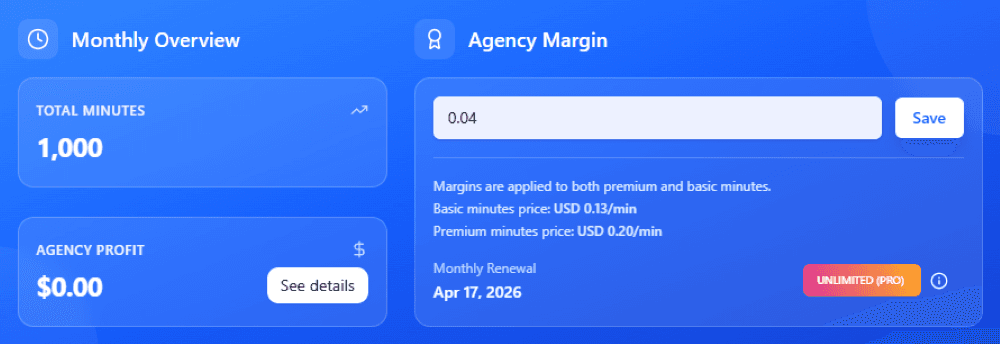
Thinkrr uses a dual-tier minute system: Premium minutes at $0.16/min and Basic minutes at $0.09/min. Your markup sits on top of whichever tier applies. Here is an example, if you set a $0.04 markup on the Premium minutes, your clients pay $0.20/min and you keep the $0.04 difference as profit on every minute they consume.
Let's also keep a few details in mind:
The markup applies uniformly to all sub-accounts by default. If you want a specific sub-account to pay the base rate instead, you can check the "Don't Apply Markup" option for that account individually.
Your primary sub-account is always charged the live base rate — this can't be changed.
Profits are tracked automatically and paid out via Stripe Connect once they hit the $100 threshold. If you haven't connected Stripe yet, do that from the Account Manager page as well.
Once your margins are set, every minute purchase across your sub-accounts generates profit for you automatically. Now let's make those purchases happen without manual intervention.
Automated Sub-Account Minute Allocation
This feature lets you set up recurring minute purchases for any sub-account on a 30-day renewal cycle. The allocation is charged using your primary account's saved payment method, with a minimum value of $10 per allocation.
The concept maps directly to how most agencies bill their clients. If you have a monthly retainer or subscription arrangement, you can mirror that inside thinkrr. Set the allocation amount for each client's sub-account, and every 30 days their account gets topped up automatically — at the markup rate you configured.
How to Set It Up
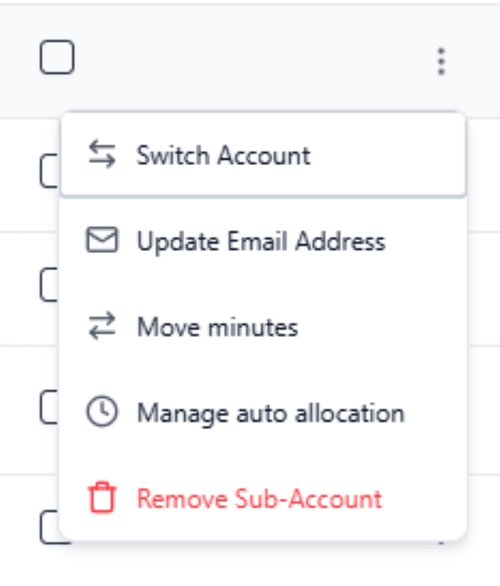
From your Home screen, go to Account Manager, navigate to the sub-account you want to configure and click on the "three-dot" menu then select Manage auto allocation.
Set the allocation amount (minimum $10) and confirm. The system will charge your primary payment method and deliver the minutes to the sub-account based on the pricing tier and markup in effect.
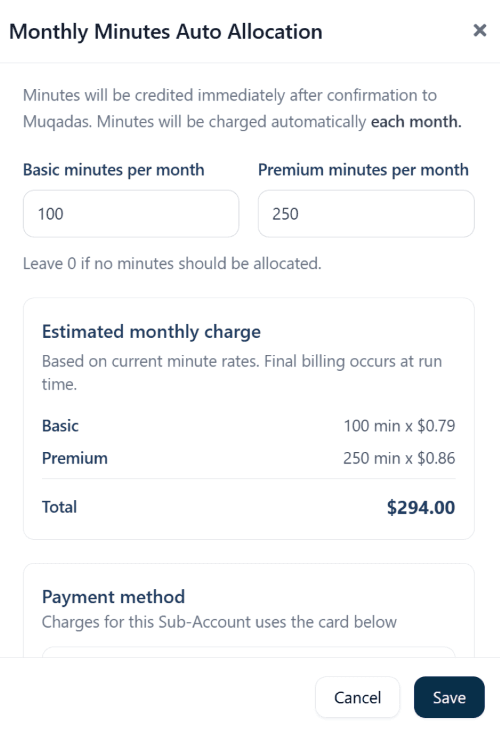
The sub-account stays operational, your margins stay intact, and your profit accumulates toward your next Stripe payout. No manual purchasing, no risk of a client running out of minutes mid-campaign because you forgot to top them up.
When to Use This
Retainer-based clients: If a client pays you a fixed monthly fee that includes a set amount of call minutes, auto allocation mirrors that arrangement perfectly.
Standardized packages: If you offer tiered packages (e.g., 500 minutes/month, 1,000 minutes/month), you can set each sub-account's allocation to match.
Preventing service interruptions: Running out of minutes mid-campaign creates gaps in contact lists. Auto allocation eliminates that risk.
Transfer Minutes Between Sub-Accounts
Auto allocation handles the predictable, recurring side of minute management. But agencies also need flexibility, and that's where minute transfers come in.
You can now move minutes between sub-accounts directly from Account Manager, and transfers work in both directions between eligible accounts.
How It Works
Select the source sub-account, choose the destination, and enter the amount you want to transfer. Before you confirm, the system clearly shows how many minutes will be deducted from the source and how many will be received by the destination.
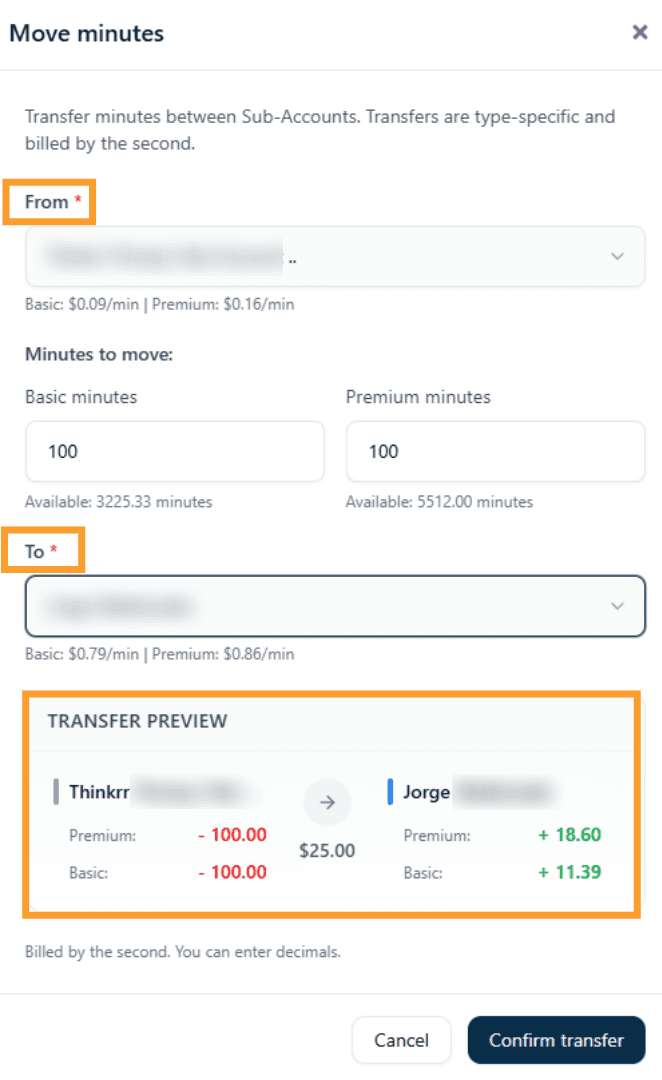
Also keep in mind if the two sub-accounts have different pricing markups, the minute values won't be 1:1. A visual warning appears whenever markup differences affect the final amount, and the values will be shown for the account you are transferring minutes to.
Practical Use Cases
Demo environments: If you're on the Agency Unlimited plan, consider maintaining a dedicated demo sub-account that's always stocked with minutes. When you onboard a new client or need to run a demo, transfer minutes from that account to get things moving immediately. Also helpful when duplicating inbound agents or outbound projects to other client's accounts, but lets leave that feature for another post.
Rebalancing across clients: If one client's campaign is wrapping up and another's is ramping up, you can redistribute minutes between them without buying more. This is especially useful when you've pre-purchased in bulk and want to allocate based on real demand.
Manual top-ups: Some situations don't fit a 30-day cycle. Maybe a client has a one-off event that requires extra minutes for a week. Transfer what they need, and their auto allocation handles the rest going forward.
Putting It All Together
Here's the recommended setup flow for any agency managing multiple clients:
Configure your Margin Settings so every minute purchase generates profit.
Connect Stripe for automated payouts once you hit the $100 threshold.
Set up Auto Allocation for each active sub-account based on the client's plan or retainer.
Use Minute Transfers for exceptions — demos, rebalancing, one-off needs.
That gives you a billing structure where the recurring stuff is automated, the edge cases are handled manually in seconds, and your profit tracking runs in the background without extra work.
Quick Reference
Feature | Where to Find It | Key Detail |
|---|---|---|
Margin Settings | Account Manager → "Amount to Charge Sub-Account" | Sets markup on base rate for all sub-accounts |
Auto Allocation | Account Manager → Sub-Account Settings | 30-day cycle, $10 minimum, uses primary payment method |
Minute Transfers | Account Manager → Sub-Account Actions | Both directions, markup-aware with visual warnings |
Stripe Payouts | Account Manager → Connect Stripe | $100 minimum threshold for payout |
Final Thoughts
Agency billing doesn't need to be manual. Set your margins, automate your allocations, and use transfers when something falls outside the routine. Your clients stay operational, your revenue stays predictable, and you spend your time on the work that actually grows the business.
For the full documentation on each feature, check out: